A translator for two people at one table. One screen on any iPhone; two on an iPhone Duo.
Two people who do not share a language put the phone between them and talk. It hears both of them, works out from the language who is speaking, and writes each person’s words in the other’s language, as subtitles.
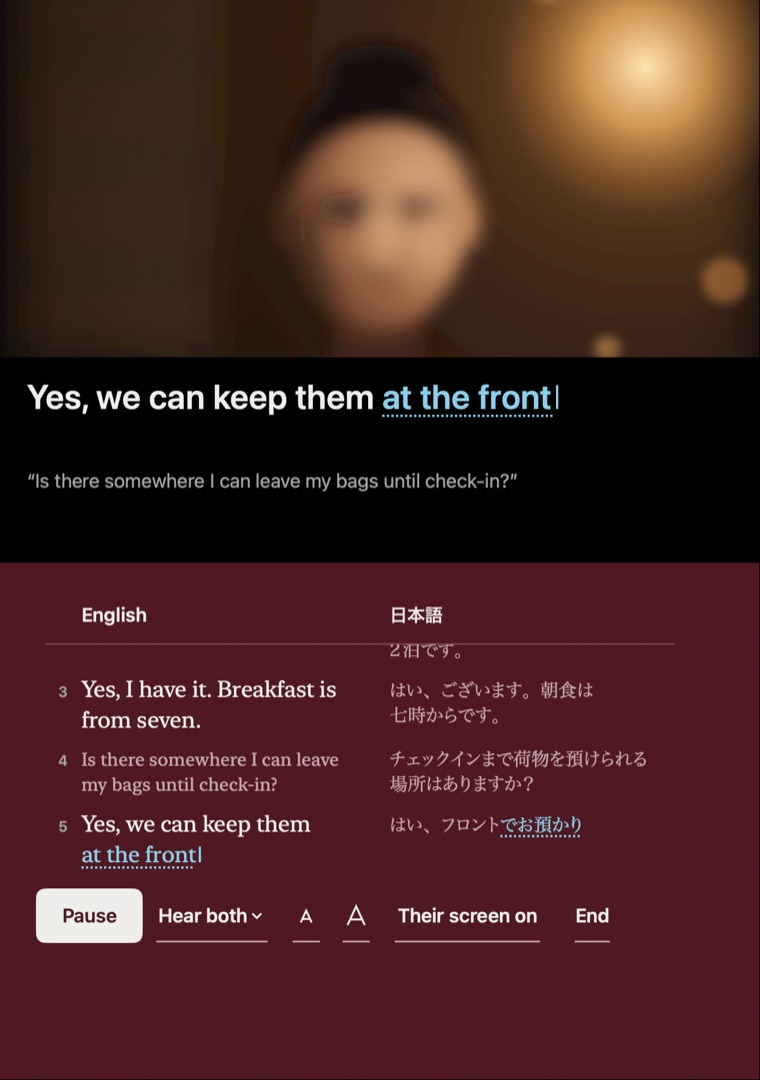
On an iPhone Duo held open between you, each of you has a screen. The inside screen shows you the other person on camera, with their words underneath in your language. The outside screen does the same for the person across from you. On any other iPhone it uses one screen: lay it flat between you and each half faces its reader, or hold it up and read both languages, line by line.
Words still being heard are written in blue, and may change. When the phone is sure of them they turn white and take a line number, so either of you can point back to line 4. On an iPhone Duo, your half of the inside screen keeps the whole conversation in both languages until you end it.
Speech recognition and translation run on the phone, with Apple’s own frameworks. The app records nothing and sends nothing, and when you end a conversation it is gone. Each language is downloaded once, through Apple, before its first conversation. It offers English, French, German, Italian, Japanese, Korean, Spanish, Portuguese (Brazil and Portugal) and Mandarin Chinese (simplified and traditional characters).

Before you rely on it
It decides who spoke from the language it hears. In tests with synthetic voices it chose correctly about nine times in ten. Take turns: when two people talk at once, words are lost. Two screens need an iPhone Duo; on other iPhones there is no camera picture. It needs iOS 27.1 or later.
Face to Face: Duo Translator is free on the App Store, for iPhone. Help is on the Support page. What the app does with what it hears and sees is on the Privacy page.